
Part 1 — The 3 current generations (plus M5 in fall)
The iMac 24" exists in three actively used generations, plus a fourth announced for fall 2026. Differences are incremental — same chassis, same 4.5K display, only the SoC evolves.
iMac 24" M1
2021First generation, 4.5K Retina display. The most affordable choice on the second-hand market right now.
iMac 24" M3
2023 (November)Minor refresh: identical chassis to M1, new chip only. Apple Intelligence supported on 16 GB+ configurations.
iMac 24" M4
2024 (October)Current version. Default RAM raised to 16 GB. Apple Intelligence preinstalled. The standard Magic Keyboard lost Touch ID — you only get it on the paid upgrade.
iMac 24" M5
2026 (rumored — fall)Per Mark Gurman, refresh expected Sept-Oct 2026. Main change: new colour palette. No Pro/Max chip — Apple keeps the iMac for the mainstream user.
Part 2 — What you CANNOT do (no matter how much you want)
Here is the part nobody likes. Apple Silicon turned the iMac into an almost completely non-upgradeable device. Here are the 4 things you hear asked often — and why they are impossible.
You CANNOT add or replace RAM
Why: Memory is integrated directly into the Apple Silicon (System-on-Chip) via "unified memory" technology. RAM is physically bonded to the processor on the same substrate. There are no DIMM/SODIMM slots, nothing that can be "added".
What it means for you: Configure correctly at purchase or live with what you have. Real advice: do not buy the 8 GB model if you want to run macOS 26 smoothly for 3-4 years.
You CANNOT swap the SSD
Why: The SSD is built from NAND chips soldered directly onto the logic board. The SSD controller is integrated into the SoC. There is no detachable NVMe. If the SSD dies, the data dies with it — and the whole board has to be replaced.
What it means for you: Backup is mandatory (Time Machine + cloud). If you run out of space, the solution is an external Thunderbolt SSD (up to 3,000 MB/s) for large projects.
You CANNOT upgrade CPU or GPU
Why: Apple Silicon = everything in one chip. CPU, GPU, Neural Engine, memory controller, security (Secure Enclave) — all on the same silicon die. The only "upgrade" path is replacing the whole logic board, which in practice costs more than a new iMac.
What it means for you: Day-one performance = year-five performance. The only viable strategy: buy slightly more power than you need today.
You CANNOT retrofit Touch ID on the Magic Keyboard
Why: Starting with iMac M4 (2024), Apple removed Touch ID from the standard bundle. You have to pay extra for the Magic Keyboard with Touch ID (about EUR 150 extra). The older keyboard cannot be upgraded — the security chip is on the new keyboard board itself.
What it means for you: Check the cart configuration at purchase. If you have an M4 iMac without Touch ID and want it, buy the standalone keyboard (about 750 RON) — it works with any Mac running macOS 12+.
Part 3 — What you CAN repair (with real prices)
The good news: a fair share of what actually breaks on an iMac CAN be repaired. Prices below are current (May 2026) for iMac 24" M1, M3 and M4, VAT included.
| Part / Service | Price | Generations |
|---|---|---|
| Dust cleaning (interior + fan) Annual recommendation. Dust blocks airflow and forces thermal throttling. | Included in labour | M1, M3, M4 |
| Thermal paste replacement After 3-4 years of intensive use. Apple thermal paste dries out over time. | 360 RON | M1, M3, M4 |
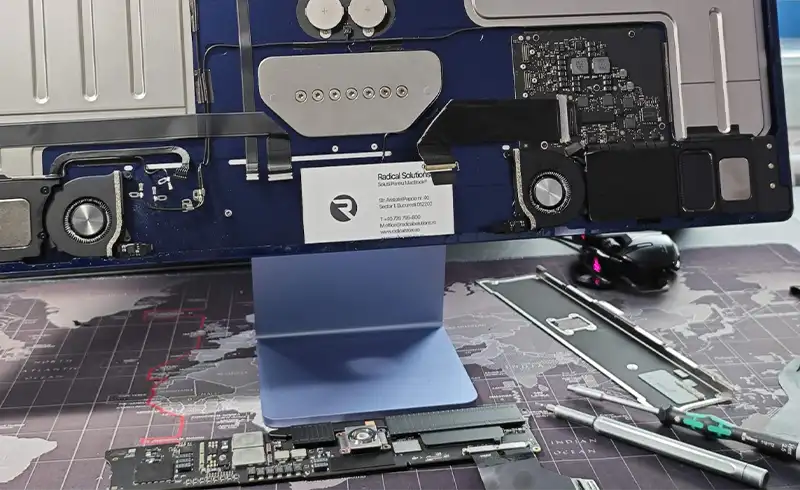
| Labour: disassembly + reassembly (any service) Covers opening and reassembly with professional tools. Without labour, no one enters the iMac. | 500 RON | M1, M3, M4 |
| 4.5K Retina display replacement The most expensive part in the iMac. Most often broken by shipping or impact. | 3,500 RON (M1) / 4,000 RON (M3, M4) | M1, M3, M4 |
| Logic board repair (microsoldering) For point-defects: PMIC, USB-C controller, power. For a dead SoC, the board is replaced entirely. | from 1,600 RON (M1) / from 1,800 RON (M3, M4) | M1, M3, M4 |
| Fan replacement (cooling) Rare — iMac fan is robust. Comes up only for persistent noise after cleaning. | free evaluation | M1, M3, M4 |
| 3.5mm jack / USB-C replacement Mechanical wear from frequent plugging. SMD component, board has to come apart. | free evaluation | M1, M3, M4 |
| Speaker / camera / microphone replacement Rare failures but repairable. The hardware is integrated on the main board. | free evaluation | M1, M3, M4 |
Note: logic board repair prices are indicative — final cost depends on the affected area and parts availability. Free diagnostic, transparent quote before any work begins.
Part 4 — Top 5 reasons iMacs come to us
From our experience (over 12 years and thousands of iMacs through our shop), here are the actual failure causes ordered by frequency. Two are almost always preventable.
Liquid spilled on keyboard or iMac
The most common board failure we see. Coffee, water, juice — all destroy SMD pads in 30 minutes. On iMac, liquid usually enters through the bottom openings (near speakers) or via USB-C ports if a cable pulls the drop in.
Solution: Within the first 60 seconds: UNPLUG, do NOT power on. Bring it in fast — ultrasonic cleaning within 24-48h has a 70-85% chance of full recovery.
Power surge
Nearby lightning, bad outlets, cheap power strips, sudden voltage drops. The iMac has an integrated power supply — if PMIC (Power Management IC) catches a voltage peak, it dies instantly. Symptom: iMac does not power on at all, no LED, no sound.
Solution: Use a UPS or surge-protected outlets. Diagnosis: if the inner LED does not light on power button press, PMIC is the prime suspect. Repairable from 1,600 RON.
Physical impact (drop, hit, careless transport)
The iMac has a 4.5K glass display across the whole front. A single frontal hit or table corner in transport cracks the display. The component is integrated — display + glass + sensors are bonded together.
Solution: Display replacement: 3,500-4,000 RON. For transport, use the original box or bring it in personally — do not let couriers handle it.
Dust buildup in cooling
The iMac has a single fan and a narrow cooling channel. In 18-24 months of normal use, the radiator fins fill with dust. That forces the fan to spin at high RPM, noise appears, and the SoC enters thermal throttling — you lose 30-40% of performance.
Solution: Annual cleaning with full disassembly. Cost: 500 RON labour (with fresh thermal paste, 860 RON total).
Natural wear after 5-7 years
Magic Keyboard with stubborn keys, a mouse that no longer holds battery, USB-C cables with widened plugs, power buttons that respond with delay. The main chips last a long time, but mechanical components and connectors have finite lives.
Solution: Individual component replacement: keyboard (450-750 RON), mouse (300-500 RON), jack cleaning (labour).
Part 5 — Repair or replace? Real-world scenarios
The hardest moment: your iMac is broken, you have a quote, and you need to decide. Below five scenarios we see weekly, with our honest recommendation.
iMac M4 (2024-2025), cracked display
iMac M3 (2023), dead board from liquid damage
iMac M1 (2021), annual cleaning + thermal paste
iMac 21.5" Intel (2017-2019), major failure
iMac M1 (2021) with dead SSD or RAM
Part 6 — Current software issues (macOS Tahoe on iMac)
Recent macOS Tahoe updates (26.4, 26.5) brought a few bugs that mostly hit iMac 24" M3 and M4. These are not hardware faults, they are software — but if you do not know, you waste a trip to the service.
macOS Tahoe 26.5 — UI stuttering on iMac M4
Multiple users have reported on MacRumors after May 11, 2026 stuttering screen savers, menus that do not populate immediately, generally jittery performance. Main cause: Liquid Glass effects asking too much from the GPU in specific conditions.
Solution: Settings → Accessibility → Display → enable "Reduce Transparency". Full details in our iOS 26.5 / macOS Tahoe guide (link below).
Tahoe 26.4 update stuck at "Preparing update"
Progress bar stays frozen for hours. Appears on iMac M3 and M4. Cause: conflict in the update download system for certain configurations.
Solution: Force restart (hold power 10 seconds), then retry. If it persists, delete the partial update file from /Library/Updates and retry.
Apple Intelligence eats memory on 8 GB models
On iMac M1/M3 with only 8 GB RAM, enabling Apple Intelligence causes heavy SSD swap and constant warmth. macOS Tahoe puts more pressure on RAM than previous versions.
Solution: Settings → Apple Intelligence → disable on 8 GB models. Use Cmd+Space for classic Spotlight.