
Logic board MacBook Pro 16" A2141 Real workshop case 6 min read Preferred source in Google

98% humidity, years of dust: how a MacBook Pro 16’s SSD burnt out

A 16" MacBook Pro, model A2141, travelled to Asia, to an area with 98% humidity. The laptop had never been cleaned inside and was full of dust. Moisture and dust caused a power circuit to short, and the voltage reached the NAND memory, the SSD, which burnt out.

Alin Marin: CEO, Radical Service
CEO, Radical Service
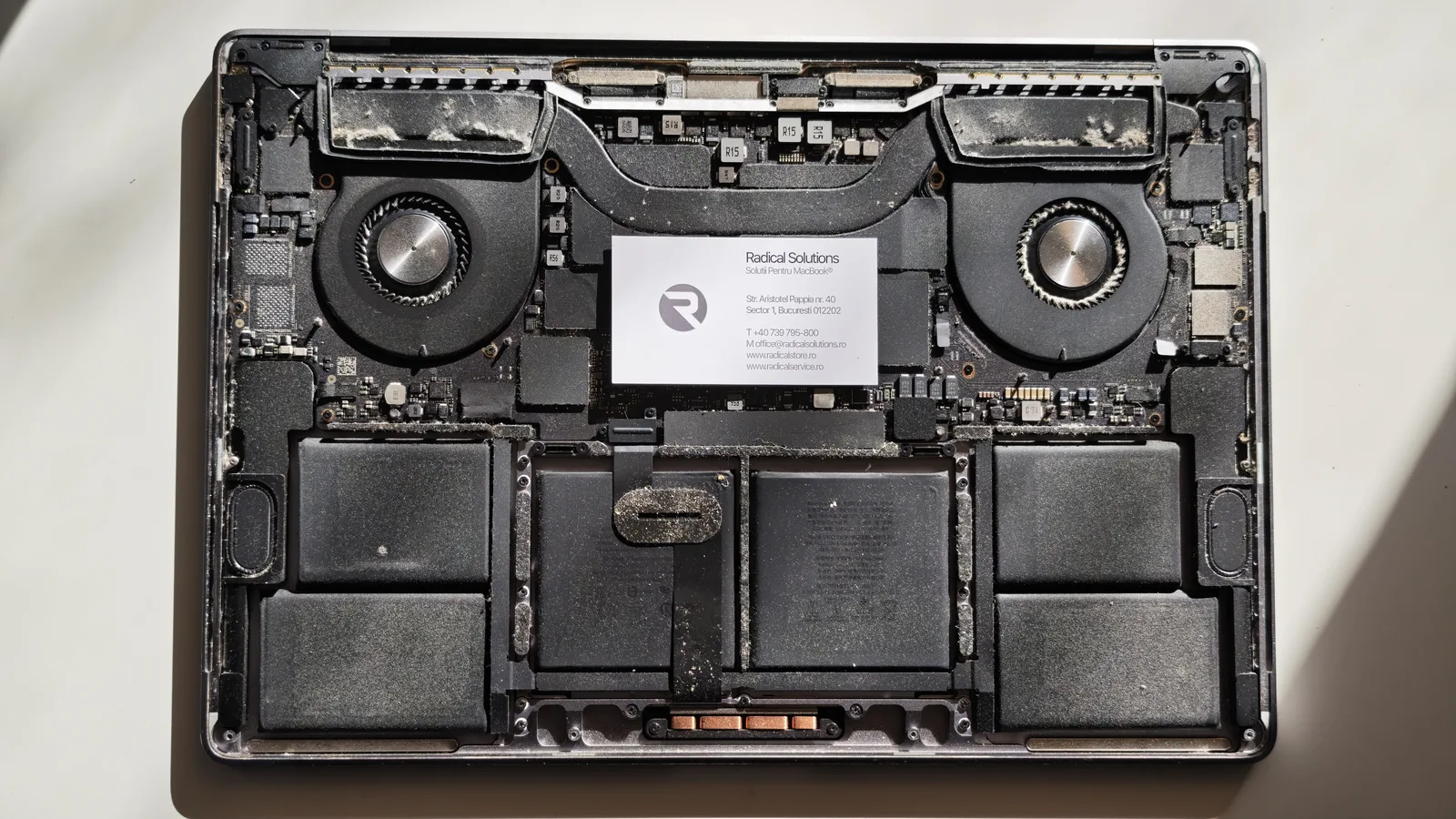
MacBook Pro 16 A2141 opened in our workshop MacBook Pro 16 A2141 opened in the workshop: fans and heatsinks full of dust, logic board and battery
MacBook Pro 16" A2141 opened in our workshop: dust everywhere, from the fans to the battery.

98%

humidity where it travelled

0

internal cleans since purchase

1 short

on a power circuit

NAND burnt

SSD memory, soldered to the board

The first culprit: years of dust

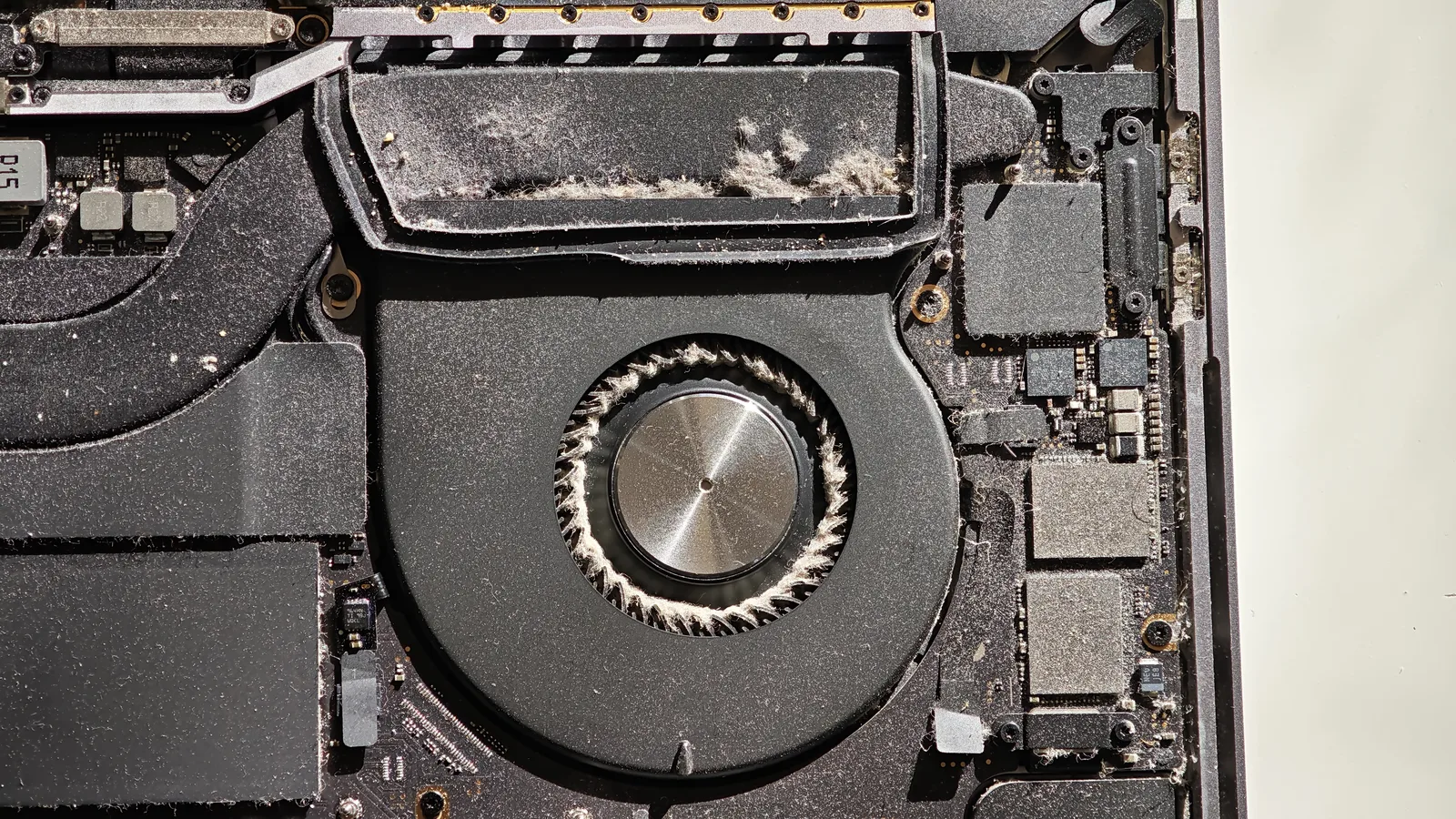
The laptop had never been to a repair shop for cleaning. When we opened it, the fans had lint caught between the blades and the heatsinks were covered in a thick layer of dust. Besides making the laptop run hotter, dust has a less visible problem: it holds on to moisture.
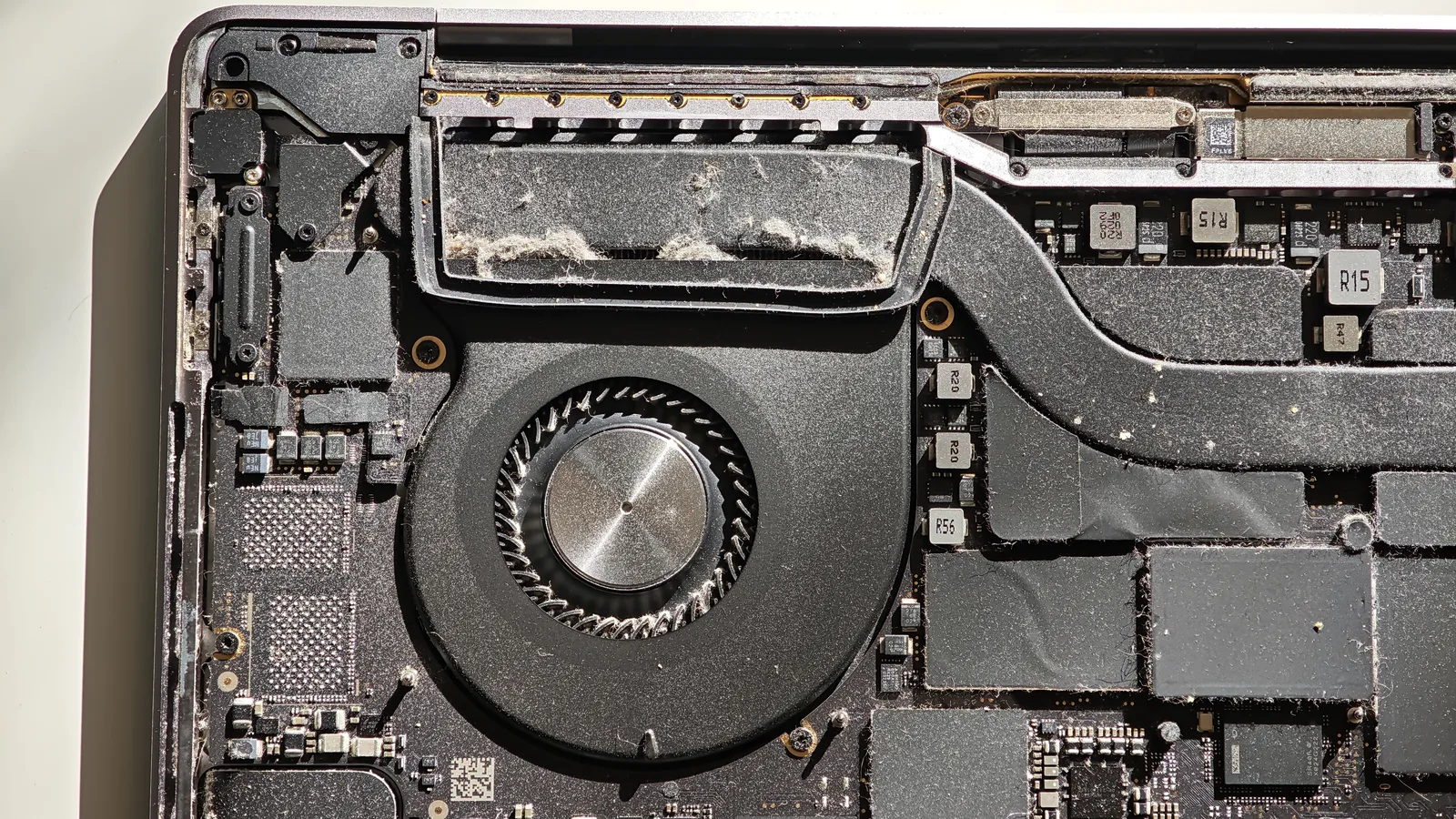
Fan and heatsink MacBook Pro 16 A2141 fan and heatsink covered in dust and lint
The heatsink, covered in dust and lint.
Lint between the blades MacBook Pro 16 A2141 fan with lint caught between the blades
Lint caught between the fan blades.

The second: 98% humidity

At 98% humidity, the air is practically saturated with water. When the laptop moves from an air-conditioned room into the humid heat outside, water can condense on the cool components inside. The built-up dust absorbs that moisture and becomes a layer that conducts current where it shouldn’t.

The result shows under the microscope: corrosion on components and contact pads, residue and greenish traces of oxidation. A laptop that had never been wet looked, on the board, like one that had been in contact with liquid.
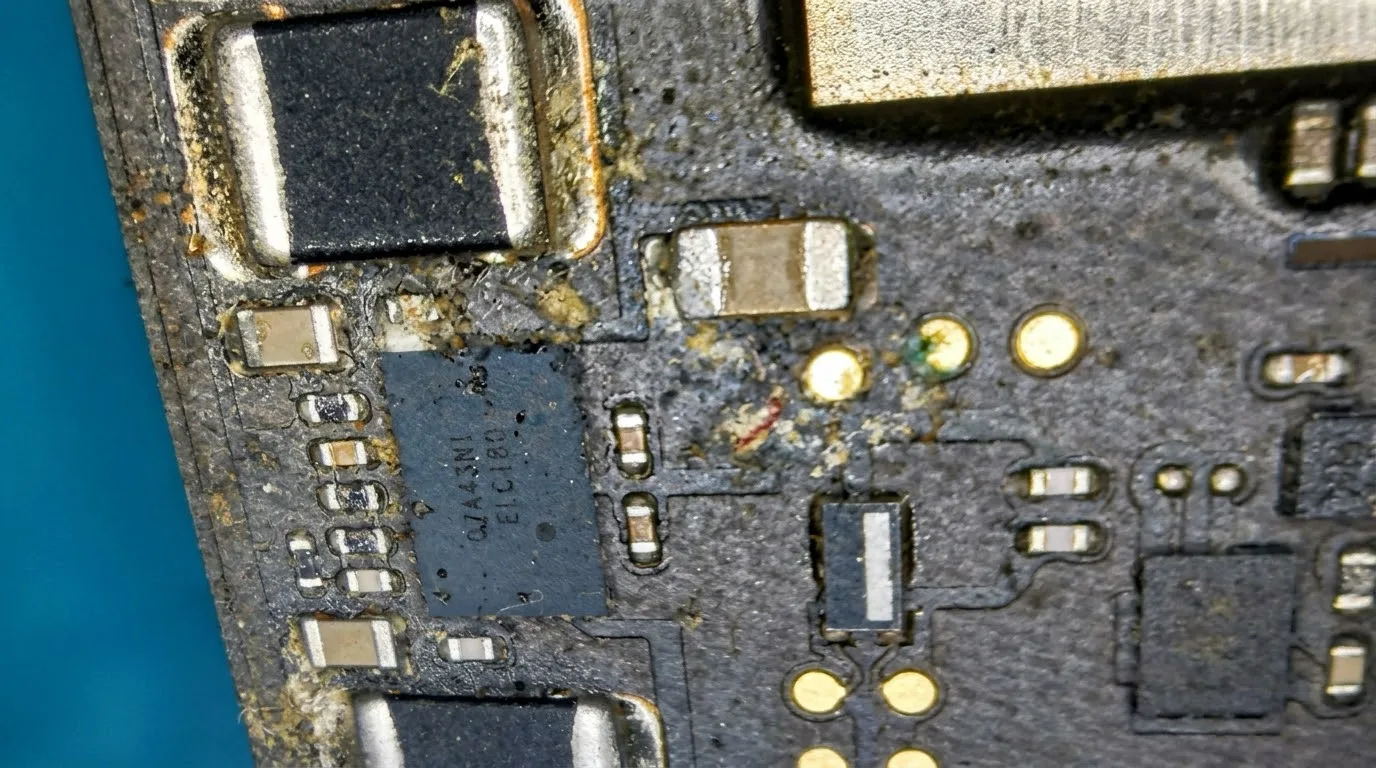
Corrosion on the logic board MacBook Pro 16 A2141 logic board under the microscope: corrosion and oxidation around power components
The board under the microscope: corrosion and oxidation around the power components.

The short circuit and the burn on the SSD

The combination of dust, moisture and corrosion caused a power circuit on the logic board to short. Voltage reached where it shouldn’t: the NAND memory, the chips that make up the SSD.

Memory chips run at low voltages and can’t withstand that kind of shock. The black spot in the photo is the burn, right on the NAND chip.
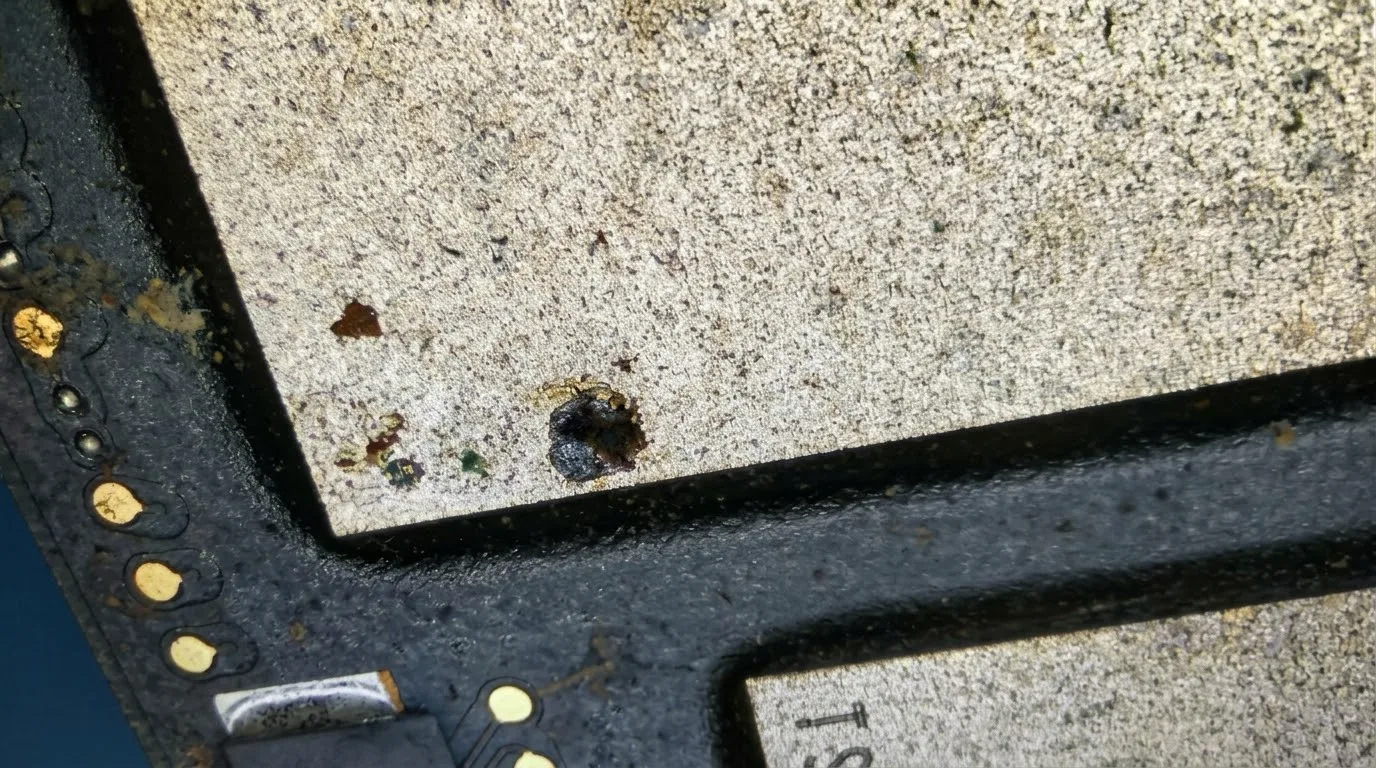
The burn on the NAND chip MacBook Pro 16 A2141 NAND memory chip with a black burn spot, under the microscope
The black spot on the NAND chip: the burn.

Why it matters on the A2141: the SSD isn’t a separate part you can remove and move to another laptop. The NAND memory is soldered directly to the logic board, and the data is encrypted by the T2 security chip. When a NAND chip burns, the data on it, in most cases, can no longer be recovered. The only real protection is a backup made in advance.

How to prevent this

Internal clean every 1-2 years

More often if you have pets, work in dust or use the laptop on a bed. A clean laptop cools better and doesn’t build up a layer that holds moisture.

Care in humid climates

Don’t leave it in damp rooms and don’t take it straight from air conditioning into the heat outside. Let it acclimatise in its bag before switching it on.

A bag with moisture absorbers

A few silica gel sachets in your laptop bag go a long way on trips to tropical areas.

Back up before you leave

Time Machine to an external drive or iCloud. On Macs with an SSD soldered to the board, a backup is the only safety net for your data.

Back from a trip and your laptop is acting up?

Running hotter, shutting down on its own or not turning on? Don’t force it, bring it in for diagnostics. The earlier we catch corrosion, the better the chances it doesn’t reach vital components like the memory.

Find Radical Service faster in Google

Set us as a preferred source: our repair guides and answers get a “preferred” badge in your Google results and AI overviews.

Add as preferred source
5.0 / 5

What our customers say

1190+ verified Google reviews

"

Am vărsat accidental cafea cu lapte pe câteva taste ale MacBook-ului, iar acestea și-au schimbat culoarea, deși laptopul funcționa perfect. M-am speriat și am crezut că este nevoie de o intervenție complicată și costisitoare. Am ajuns la Radical Service, unde domnul de acolo a analizat problema și a identificat rapid cauza. Soluția a fost mult mai simplă decât mă așteptam: a scos două taste, le-a curățat și le-a montat la loc. Totul s-a rezolvat foarte rapid, fără să-mi ceară niciun ban! Am apreciat enorm sinceritatea, profesionalismul și promptitudinea. Într-o perioadă în care multe service-uri par să caute intervenții cât mai costisitoare, experiența aceasta mi-a demonstrat că există și oameni care pun clientul și rezolvarea problemei pe primul loc. Recomand cu toată încrederea Radical Service

Ioan Alexandru Stan

Ioan Alexandru Stan

în ultima săptămână

"

Am apelat la acest service datorita recenziilor bune. Mi-a fost spus ca o sa mi se schimbe tastatura plus backlight in urma unui contact cu coca cola. In urma reparatiei am primit laptop-ul cu tasta de langa shift care nu se aprinde si tastatura care nu se apasa bine (tastele fac doua click-uri, si feedback-ul tastelor nu este unul bun, sunt instabile). Aceste lucruri nu mi-au fost comunicate inainte sa trimit laptop-ul. Am incercat sa contactez firma sa vina cu explicatii, si mi s-a spus ca tastatura nu mai este lipita ca cea originala si este prinsa in suruburi. Iar punctul interesant a fost ca mi s-a spus ca ei “nu vad problema” la tasta tilda care nu se aprinde din cauza backlight-ului. Si mi-au oferit varianta sa inlocuiasca topcase-ul cu totul la un pret mai mic, lucru care dupa parerea mea trebuia mentionat de la inceput. As fi putut macar incerca o curatare a tastaturii originale daca stiam. Sau macar sa isi asume problema backlight-ului. Sunt putin dezamagit de serviciile lor si mi-ar fi placut sa am o experienta mai buna de povestit.

Alex Ambrinos

Alex Ambrinos

în ultima săptămână

"

Recomand cu încredere!

Flo

Flo

în ultima săptămână

"

Inițial, pe baza fotografiilor trimise, am crezut că laptopul nu mai poate fi reparat. Însă, după înlocuirea componentelor avariate, inclusiv a ecranului, nu se mai observă nici o urmă. Service profesionist, recomand.

Cristian Popescu

Cristian Popescu

acum o săptămână

"

⭐⭐⭐⭐⭐ Oameni super profesioniști, recomand cu mare drag! Am fost la ei pentru un iPhone 11 și am rămas foarte plăcut surprins de servicii. Mi-au schimbat bateria cu una originală direct pe loc și mi-au pus și o folie de protecție, totul rapid și fără bătăi de cap. Apreciez mult corectitudinea lor — mi-au dat factură și au făcut absolut totul ca la carte. Pe lângă profesionalism, contează mult și cum ești primit: m-au întâmpinat cu o cafeluță caldă, un gest mic, dar care arată respect pentru client. Mulțumesc inteligenței artificiale că i-a găsit și echipei pentru seriozitate. Jos pălăria, chiar merită toate cele 5 stele!

Marian Cică

Marian Cică

acum 2 săptămâni

"

Am ajuns la Radical la recomandarea unui prieten. De-a lungul timpului, aici am reparat două laptopuri (unul cu whisky vărsat pe tastatură) și un ecran de iPhone. De fiecare dată rezolvarea a venit în cel mai scurt timp, mi s-au explicat clar și transparent variantele de reparație, costuri și durată. 10/10 recomand, serviciile lor sunt ireproșabile prin filtrul experienței mele.

Tudor Rus

Tudor Rus

acum o lună

Frequently asked questions

Can humidity damage a MacBook even if it never got wet?

Yes. At very high humidity, like the 98% in this case, water can condense inside, especially when the laptop moves from air conditioning into warm, humid air. Dust built up over time holds on to that moisture and becomes a layer that conducts current between components. That can lead to corrosion and short circuits.

How often should a MacBook Pro be cleaned inside?

We recommend an internal clean every 1-2 years, more often if you work in a dusty environment, have pets or often use the laptop on a bed or sofa. The laptop in this article had never been cleaned, and its fans and heatsinks were full of lint.

Can data be recovered from a burnt SSD on a MacBook Pro A2141?

In most cases, no. On the A2141, the SSD memory (NAND) is soldered directly to the logic board, and the data is encrypted by the T2 security chip. When a NAND chip burns, the data on it can no longer be read, and there’s no separate SSD that could be moved to another laptop. That’s why regular backups are the only real protection.

Why was it the SSD that burnt?

A power circuit on the logic board shorted, and voltage reached where it shouldn’t: the NAND memory. Memory chips run at low voltages and can’t withstand that kind of shock. The burn mark is visible right on the chip, as a black spot.

What should I do if I travel with my MacBook to a very humid area?

Don’t leave it in damp rooms or on a balcony, don’t take it straight from air conditioning into the humid heat outside, and let it acclimatise in its bag before switching it on. Use a sleeve or bag with moisture-absorbing sachets and make a backup before you leave.

Has your MacBook never been cleaned?

An internal clean costs far less than a logic board. And it can save your data.

40 Aristotel Pappia Street, Sector 1, Bucharest · Mon–Fri 08:30–17:30